


As we strive harder to achieve the ideal of a paperless office, we realize that we need good file management systems to actualize this goal. For all of us using WordPress, the good news is that there are some really good document management plugins around.
In the past, many people opted for Joomla just for its Docman plugin, but this is no longer necessary as WordPress, combined with the plugins we are reviewing here, is more than enough to handle your document and file management needs.
The Top 6 WordPress Document and File Management Plugins
| Plugin | Price |
|---|---|
| Document Library Pro (Recommended) | $119 |
| Download Monitor | $39 |
| WP Download Manager | $59 |
| Dropr Dropbox Plugin | $24 |
| WP File Download | $49 |
| Easy Digital Downloads | $199 |
Most of the above plugins are actually described as WordPress download managers, but they do the job of document and file management perfectly well.
My favorite is Document Library Pro. It’s backed by a great team so it looks like it will be around for many more years to come, which you always want since their software is managing your documents and files.

Recommended: Document Library Pro
WP Mayor's readers have chosen Document Library Pro as the best plugin to create a searchable, sortable document library for your WordPress site.
Get Document Library ProTo understand all your options, check out the more detailed description of each plugin below.
Document Library Pro

The Document Library Pro plugin has everything you need to add, manage and display your files and documents.
It provides 4 quick ways to add files to the document manager including drag and drop file upload, adding files individually, and uploading in bulk from a CSV file. The documents are stored in a dedicated area of the WordPress admin, making them easy to manage outside of the Media Library.
Once added, you can display the files and documents in a searchable, sortable table layout on the front end. There is a choice of layouts and customers can use the instant AJAX search and filters to quickly find the documents they’re looking for.
This document management plugin supports all file types, along with embedded audio players, video, and other multimedia content. It is popular for a wide range of use cases including creating a WordPress audio library, video gallery, eBook library, and many others.
The plugin is quick and easy to set up, and Barn2 provides lots of help and support in case you need it. This includes incredibly detailed documentation, expert support, a step-by-step document library tutorial, and even a free e-course about how to build a document library.
Download Monitor

Download Monitor provides an interface for uploading and managing downloadable files (including support for multiple versions), inserting download links into posts, logging downloads, and selling them.
If you want to keep your files organized, this plugin comes in handy. You can easily monitor the number of downloads a file has, along with an easy way of linking to those files using shortcodes.
Download Monitor gives you the ability to categorize, tag, or add other meta to your downloads and keep them well organized. And there’s more! You can also add multiple file versions to your downloads, each with its data like download count and file links.
The Download Monitor plugin also includes various templates for displaying your downloads more professionally. Manage your document files with more powerful extensions: Page Addon, Amazon S3, Buttons, Email Notification, Downloading Page, Google Drive, Captcha, and much more.
Dropr

Dropr basically allows you to turn your Dropbox account into a secondary WordPress Media Library. Access your Dropbox files from the WordPress text editor screen, then drop files into your content as you please without ever having to upload them to WordPress.
This makes it a great way to save bandwidth, plus Dropbox offers better file management than WordPress.
WP Download Manager

WP Download Manager includes all the features you need to control your file downloads. Here’s a quick look at a few of them, and if those are not enough, you should check out their extensions:
- Password protection on downloads
- Download visibility based on member roles and capability
- Price variations
- Licensing
- A hit counter
- A detailed download log
- and many more.
It even offers social lock options. These allow you to boost your social media appearance by locking your downloadable files using different social networking options.
Apart from that, you also get integrated html5 players and shortcode options for audio streaming, a digital store and marketplace option, integrations to create membership sites, and so on.
If that’s not enough, this file management plugin also provides a mobile screen that allows you to monitor download and sales stats on the go in a sleek dashboard. Looking to try it out first? Use their free demo.
Lastly, WP Download Manager gives you the opportunity to save hundreds upon hundreds of dollars through their Discount Packs. Whether you need payment gateways, themes or another great combination of add-ons, these are the best deals you’ll find.
WP File Download
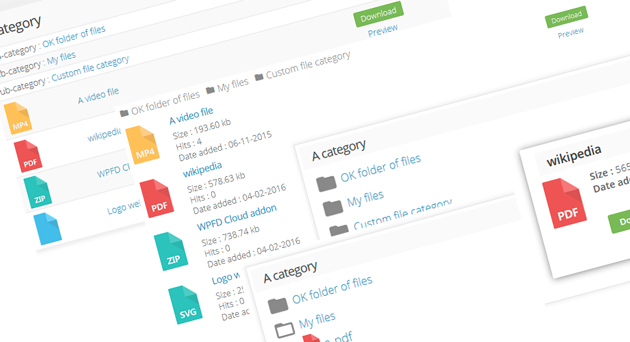
WP File Download is an easy to use yet powerful WordPress file management plugin. The amazing user interface is a huge time-saver for professionals while staying accessible for final users. Create a file category, drag’n drop your files then insert a file category or a single file directly in your content. WP File Download brings you a lot of professional features to manage files: 1 click file ordering, 4 responsive themes, file versioning, file importer, remote download, user role file access limitation.
Unique download manager features: the plugin has a highly flexible full text search engine and Google Drive and Dropbox cloud integration with double way synchronization.
Learn more about WP File Download in our extensive review.
Easy Digital Downloads (eCommerce)
I know many readers find this post when looking for a good plugin that can handle the selling of digital downloads or the option of offloading media and files for better site performance. The best plugin for this is Easy Digital Downloads, created by established developer Pippin Williamson. It is a free plugin with premium add-ons.

Selling digital downloads is something that not a single one of the large WordPress eCommerce plugins has ever gotten really right. This plugin aims to fix that. Instead of focusing on providing every single feature under the sun, Easy Digital Downloads tries to provide only the ones that you really need. It aims to make selling digital downloads through WordPress easy, and complete.
Features of the plugin include:
- Cart system for purchasing multiple downloads at once
- A complete promotional/discount code system
- Many payment gateways. PayPal and Manual are included by default with Stripe, PayPal Pro, PayPal Express, and others available as add-ons
- Complete payment history
- User purchase history and the ability to re-download files
- Multiple files per downloadable product
- Variable prices for multiple price options per product
- Customizable purchase receipts
- Earnings and sales charts
- Detailed purchase and file download logs
- Data export options for CSV and PDF
- Extensible with many add-ons
- Developer friendly with dozens of actions and filters
Likewise, offloading media, files and documents to services such as Amazon S3 and Dropbox will help your site in a number of ways.
- Benefit from the security features offered by each service
- Potentially reduce hosting and transfer fees since you won’t be using your site’s server bandwidth
- Access to the free high-availability features of each service
- Excellent integration with your WordPress site
- Automatic expiration of download links to prevent link-sharing
Which Is The File Management Plugin For You?
Whether you’re after a solution to list documents, files, or even digital downloads, finding the right file management WordPress plugin for your needs is a vital step to take early on in your journey.
We put together this list to help you find the best solution for your website, so I hope you’ve found it helpful.
Don’t forget to leave a comment below if you have any opinions on the above plugins or want to suggest any other good document management plugins for WordPress.


117 Responses
Thank you for taking the time to let us know you appreciate our content.
Hi, I’m a WordPress developer in the Philippines and for me the WP Download Manager for me is far the best. It’s very convenient. I’ve tried some other plugins (that are not mentioned here) but after a few days my site got hacked. So i think before choosing these plugins. Always do some research first, check reviews and always check the security of the plugin. I haven’t had an issue with this plugin (WP Download Pro) so far…having a lot of links and big files, when you upgrade to Pro, it’s even much better because you can always ask for support. I have run into issues support has been fast and helped me solve them, most have not been issues with the plugins by my implementation, I highly can recommend.
Great List so far.
Thanks. Cheers!
I’m glad you found WP Download Manager to your liking! Thanks for your feedback 🙂
You happen to know if any of these will do a download rotation? In other words, I’m looking for a plugin that I can upload say 10 files to a folder, then each time a file is downloaded it will move to the the next one, etc. etc.?
Thanks for the list. I think Prevent Direct Access Gold is also a good file management to try out. It allows users to protect and manage WordPress media files in the Media Library. Each protected file will have one management popup including all its information such as private download links, expiration time, download limit, access permission, and ton more.
Hi,
Thanks for compiling these plugins but I like the idea of SharePoint when sharing a secured file for a specific client. It only requires an email address and when the client received the email notification with a link it requires code verification sent to the client’s email address again to access it. Just wondering if there’s a WP plugin that works like the above features.
Thanks
J
Interesting Article
What is a good word press solution to allow automatic access to files only after registering through an online NDA or contact form etc…?
Maybe some validation of the supplied contact information with text or email authorization code?
Yes, you could do it how you’ve described as a custom development.
If you’re looking for an off-the-shelf solution, then you could do it like this:
– Password protect the document library page (you can easily do this using the page visibility option that comes with WordPress itself).
– Use a contact form plugin such as Contact Form 7 to allow people to register. This will send their details to you via email.
– You can then add an autoresponder to the contact form which automatically sends them an email containing the password.
Alternatively, do you mean that you want to show the document library to everyone but only allow people to download files after they register. You can do that by using Posts Table Pro with the Advanced Access Manager plugin – they work nicely together. Advanced Access Manager comes with a shortcode that you can wrap around the download button or links so that they only appear for logged in users with the correct role.
Sempre aprendendo, obrigado pelas excelente informação como estou começando preciso está em busca conteúdo que posso sempre me ajudar!
Download Monitor Advanced Access Manager extension doesn’t work.
I have tested it thouroughly and it does not limit downloads by I.P address or user.
I have seen comments about this which are more than 3 years old on the plugin forums for Download Monitor, which has a new owner.
Maybe thats why Mike Jolley sold it.
Hey Sam, have you contacted their support team about this issue, or did you just see the existing comments?
Hello! I am the developer of the “Document Management System” plugin and would like to include it here. There is a free version as well as a Pro version.
The Free version is here:
The Pro version is here:
Thanks!
Brian
Hi Brian – Is there a contact number that we can reach you? We need some help with your plugin.
Nice collection! I usually use this: to manage my files because I can compress and encrypt them easily at the same time, but you gave an interesting collection of managers
Gostei muito da relação de plugins que foi mencionado neste post. Parabéns pela postagem Jean. Ajudou muito.
Hi, is there a download manager plugin that doesn’t require users to register, just upload file less than 250mb and share the download link?
Hi Jack, you could do this using Gravity Forms which can automatically create a post (with the download attached) when a user submits the form. You can then hold it for moderation by the administrator if needed. Since it’s just an online form, users don’t have to register. You could then display the user-submitted posts (or custom posts) in the usual way or as a table using Posts Table Pro – barn2.co.uk/wordpress-products/posts-table-pro.
A lot of people use the Posts Table Pro WordPress plugin to manage the files on their website. Each one is added as a post or custom post, and the plugin dynamically displays them as an interactive table which you can search, sort etc. to find the file you’re looking for.
Shop Toddler Nike Packers 27 Eddie Lacy Green Team Color Stitched NFL Elite
Jersey online right now, wholesale fashionable sports nike
NFL jerseys from China are selling. we offer Nike Bears 6 Jay Cutler Navy Blue Team Color Youth
Stitched NFL Elite Jersey fast shipment & good quality to you.
Hello,
There is also the “Document Management System” plugin as well.
Very informative post. We must be vigilant against hackers all the time.
You’ve made some great points here. Glenn Shepherd actually talked about
this in one of his first Techy Thursday webinars. Yes, I’m an iPro partner.
There are two free plugins that we can get to cover a lot of what you mentioned and some things not mentioned here:
Acunetix WP Security
All In One WP Security
You can install them from your WP back office in the plugins section.
One of the things not mentioned has to do with the changing the login page URL from the standard one provided by WP when you first install it. This can stop a lot of brute force login attempts because it’s not easily identifiable by the robots that hackers use. It can be done in the All In One plugin listed above.
I hope this helps you and your readers to protect the websites.
Awesome… This is very nice list.
Nice collections! I really appreciate it and want to say thanks to you.. 🙂
Good recommendation. Wordfence Security is a great security app too. I use it and it provides functions of three plugins from the above combined. Login locking, Force locking out bots or heavy users or lechers and many more.
Good idea!
Thank you for this overview of document management plugins. I was looking for document management plugins to create a system that meet ISO-9001 standards. I have been using professional DMS software before, but I think it has to be possible to compose the same thing using wordpress as a CMS.
I recently discovered the Mendeley Plugin;
That one might be interesting reviewing. You can use the external document server and call lists of documents at your website.
I will definitely give that plugin a look Jeroen, thanks!
Useful article, but its not economy for big sites like movie sites.
I using big and unlimited free storage like megafile to upload and keep my files.
For example on i have unlimited free storage and up to 2GB upload possiblity per files.
Then i use uploaded link to share on my site content.
Its my experience on data storage, finally because of economy reason you need a trustable free storage.
another one wordpress.org/plugins/xfile/
Came across your site when searching for a plugin,Appreciate the post! Just wanted to show some love for taking the time to write this article.
Thanks Peter, did you find a plugin that does what you needed?
there is a new one, xapp-commander, beats them all in usability & features, extremely useful if it comes to admin and developer-tasks, also 2 priceless picture editors included. give it a try!
I use Justin Tadlock’s Members plugin to create a Members site. I want to put premium content (such as white papers) behind a registration form. This premium content will be written by various third party authors, and I want to share the contact info of my members with the authors whose content got them to sign up. For example, an author will write Paper A, so I want to be able to identify every member who downloaded Paper A and share that with her, but not members who only downloaded Paper B.
My question is, which of these plugins will allow me to export a csv file containing email addresses of everybody who downloaded a particular file?
WordPress Download Manager has all the features you need there.
Hey,
Thanks for the information, I would suggest this new one.
Plugin directory:
Full version:
Have you tried it Tristan?
Team,
I’m doing my research now and don’t know if I’ll coming back. But in my research these folks (Premium $75) look the best. Perfect for folks who have clients who have staff. Remember, I have NOT purchased or installed, just going by feature-set.
check the Home Page video too, has NEW features.
Interesting, let us know what you end up getting.
Great article, thanks for sharing. These is a lot of useful information to take away from this post.
Hi, is there a download manager so user get 1 on 1 sharing. meaning for every upload the make after aprove by admin they get one download. please let me know!
DONT buy WP DownloadManager PRO!
Their service is the absolute worst I have ever seen. They need days or even weeks to reply and couldn’t help me get the plugin working properly. Don’t buy their pro version! If it is not working on your site like you want it to you will be let down and won’t get your money back.
Could you expand on the problems you had so other readers can make an informed choice?
I try the download manager. Its function let see how long its function.
Hi nice post
Came across your site when searching for a plugin or maybe a mix of plugins to achieve the following..
you upload a file, enter an e-mail address, an e-mail is sent with a download link to the file.
If the link self expires would be desired too. You know of such functionalities?
Download Monitor is not discontinued it was running with new version.
It was discontinued for a while, now there is a new version, updated the post, thanks for reminding me.
I manage and Institute at the University of Houston and we have lots of corporate members who have authored white papers and other studies. They want to be able to share these documents with people in our industry. What tool would be the most effective way to gather these documents and allow people to log in and download whatever they are interested in. We just began soliciting reports and have been OVERWHELMED at how many documents and studies people have volunteered to provide!
Have you tried WP Download Manager?
Dear Jean,
thanks for your survey – that helps a lot when you are considering to use such a plugin!
I just noticed you are classifying the “WordPress Download Monitor” (by Mike Jolley) as “discontinued”, but if I follow the link to the download site or to Mike Jolley’s site I cannot find any corresponding information.
Kind regards,
Robert
The plugin is enjoying a new lease of life, the links now work.
FYI WP Download Monitor was rebuilt from scratch and re-released as a “version 1” – 🙂
That’s right, updated the post 🙂
Hi Jean
Thanks for this extensive list. I have become the new webmaster for my club site, and as such, and trying some new things. We currently have a very archaic site that has to be updated each time a document is added, such as monthly meeting minutes, or a news letter. I am looking to replace that with something more dynamic, using WordPress as the front end. It seems several of the plug ins you mentioned here would do the trick, so I am curios which one would be the best. The whole site is behind an access control site, so I don’t necessarily want people to have to log into WordPress separately if they don’t have to.
Thanks
I find it interesting that there isn’t a good plugin to present a set of mixed file types to a client via a client page with thumbnails, meta data and previews (i.e., playback or thickbox )
The best way to describe this would a plugin similar to Apple’s cover flow.
I’m wondering if there’s a way to use one of these plugins in conjunction with other plugins to have a more robust library with better presentation to add icons, thumbnails and previews of images, files and videos?
For my purposes, I am creating an online repository of branding assets for many products (PSD, AI, PDF, PPT, TIF, JPG, etc.). So each product will have graphics files and branding guides and perhaps even a few videos.
I would really like to be able to show thumbnails (automatically generated of course) of all files or the file type icon and an option to download or preview.
Separately, I’d also like to use something like this for a client area. Primarily as a repository for uploads and downloads but again with nice thumbnails and previews.
I think SP Client Document & Project Manager came close. I have to check again as I have looked at too many of these today… I didn’t like the way the files where displayed, No list options.
thx,
I’ve found this amazing plugin to manage my pictures
@Jean Any suggestions if I need an alert on file expiration, When file expires I need a notification email sent out to the admin that the file is about to expire.
I’m not sure as I haven’t needed this feature, however it shouldn’t be too hard to implement it yourself if none of the plugins do it. Try WP Download Manager and email the guys with your requirement, I’m sure they’ll help you out with implementing this feature.
too bad they discontinued WordPress Download Monitor i loved that plugin 🙁
You can consider also
Hi, i am looking for a solution for people to put (upload) file to out ftp server. We need PDF, DOC and some other file from client between 100 ans 250 meg and i dont what to force the customer to use a ftp client, jut login in the site and “send” the big file !… wich one do the job ?
This is possibly the only such plugin I’ve heard of: haven’t tried it myself though and it’s not been updated in some time.
Appreciate the post! Just wanted to show some love for taking the time to write this article. Very helpful
Welcome!
hey can you please help my content box in wordpress (where content is pasted and editing is done) it happens automatically wat 2 do man??
The files I want to make available for download are created as the result of a non-logged in user,s form inputs i.e. on Submit the server takes the inputs, does a bunch of work and builds a file that I would like to offer for sale through a download manager. The file is more “fun” than “private” so I am not worried about who can download it. So I am looking for a download manager that has a broad enough API that it can automaticially add a new download file via the API (ideally using a product template to the the files, price and control features are copied from. Do any of these do that??
Not sure any of these plugins can handle that, sounds like a good case for custom development.
Hi there,
Thanks for your wonderful post.
I’m looking for a plugin that would automatically organized the contents in a post by just filling in form.
For example, there are different form fields, one just need to key in the form fields, and all these will be captured and show in a post in a structured and predefined manner.
The reason is so that different authors will be able to post with a standard template and more structural in a way.
Not sure whether you have came across something similar?
Hi Alvin,
Have you had a look at podsframework.org? I’ve found it really powerful and it can control inputs to provide a customised page with specific text, numerical and other data entry fields, downloads, custom taxonomies and data validation.
It’s perhaps not the easiest to get started on and the developer is still writing documentation for the new version but if you’ve got a decent grasp of php it’s a great plugin.
Now that Angela mentions it, yes that would be an excellent solution. I think Gravity forms can also accommodate this when combined with Custom Post Types.
Hello, I enjoy reading all of your article post. I wanted to write
a little comment to support you.
Hi.
Thanks for your effort! I’v been through most of these now (very quickly) trying to find a plugin that will meet all my needs 🙂
I find that the easiest way for my users to upload documents in articles is to use the built-in media manager (not very organised, I know).
However, I would like to list the documents they attach, in a widget. I have tested the “Related Documents” widget, but this only lists the document in a post or page.
Do you know of any plugin or widget that would list the documents for a complete category?
This can be done, I’m not too sure there is a plugin that does it out of the box though, it seems more like a case for custom functionality.
Hi!
Thanks for this list of plugins, i am going to try each one as i am searching for a “tax services cpa” system for a client.
Something where users can buy a tax service (maybe in a shopping cart system), upload a document, and get back their tax service prepared.
A kind of download manager maybe, still don’t know but will find a solution.
Great post!
Hey Nicola,
What I suggest is that you let the user/client upload the document via a form (Gravity forms can submit to a custom post type for nice management), then add a way for them to purchase the service via Paypal. They will then receive the tax service via email.
Alternatively take a look at Easy Digital Downloads which is geared specificially for digital services.
Bdw could your post your question as a comment on that post so it will be helpful to other users who are searching for something similar? I will then reply there.
WP-Client was designed from the ground up to serve many of the needs requested in this stream of comments. Private client portals, unique permissioning system, file upload/download, file categories, private messaging, and a lot more.
Nice post Jean, and it definitely generated some good discussion
Thanks!
That’s an interesting product Mike, hope you do well with it, keep us posted.
Indeed interesting. Thanks.
I would like a plugin which handles uploads from members
by putting the upload into a category, probably by means of a form with upload capabilities.
From there I want other members to be able to download those uploaded files. I have searched the web and as yet not found any plugins that do this job. Can you help ?
I have set up the menue on my site and under “lots” have uploaded some but only I am allowed this facility unless i make members admin – which i do not want to do. Plus it looks clunky and was quite difficult to place then in a page.
I’m not sure I’ve encountered a plugin that does just that, although a combination of plugins will achieve it. You could create a custom post type and then use Gravity Forms to create the file uploads form directly into that custom post type. A member management plugin would then be required to handle which users can download the files.
Will keep my eyes open and report back if I find a better solution.
Hi Wittylady,
I am looking for similar plugin that would let a member to upload files. If you happen to find one, could you please share ?
Thanks,
R.
Did you happen to find anything suitable?
@NRKey
What you said is just “basic” customer service. And they have already lost business from two people who have asked me about their plugin and wanted to learn more about my experience with the company. What do you think my recommendation was?
By the way, as an update (8/6/12), they essentially ignored me going forward and did nothing.
DO NOT GIVE THIS COMPANY ANY MONEY. You do so at your own risk.
Just to add, I’ve had problems with this plugin. My site takes 7 seconds to load my plugins (70% of this is due to wpdownloadmanager) and it’s getting worse as I upload more files. Support is inconsistent and sometimes queries just don’t get answered, or get cryptic answers that upon further investigation turn out to be recommendations for “custom development” at $50 per hour. The update that was supposed to be out in July to fix most issues is still nowhere to be seen.
The premium version of the plugin seems to entitle you to the same kind of support and help that you’d get from most of the free plugins available elsewhere.
I’m now looking for an alternative as I’ve come to the end of the road with this plugin. No doubt it’s ideal for a small document repository but for >100 docs, it’s crawling. Use with caution and test thoroughly before buying.
Thanks Angela, let us know if you find a better plugin so we will include it.
Will do. Thanks for this page though – am currently investigating the others so resources like this are hugely appreciated!
@David McGuffin,
— If you really facing any issue, certainly you are missing something that need to do to make it work. But matter is we even don’t know what you missing without checking that as the plugin is working great for us and every other users.
“This was completely unreasonable to us as it is a well know fact you NEVER give your WordPress login details to a third party.”
— actually it’s totally depends on your mentality! as for many other high traffic and sensitive sites, they trust us doing their regular upgrade of wpdm pro.
— up to now 300,000+ installation of wpdm pro, they are using it happily
— support team replied, they will refund you but they need to be confirm. Now, even not seeing anything, who will even know that, what you are saying is true. But we’re sure, its certainly will be working fine in your site.
— we have full open demo to test/check every features and functionality.
— you could at least make a test environment and send access to support team if you were honest with your word, if we see its not working for you what will we do with your money? you just said it’s not working and give me redund!!!
Man, try to be reasonable, at least, to prove your own words.
@Shaon
Be reasonable man, and don’t assume that every client will give you access to their environment (most company security policies don’t allow this at ALL), be it production or not, and don’t assume your client is lying and ask them to prove it. Not professional Man.
Your refund policy:
-As we are offering non-tangible digital goods, we do not generally issue refunds after the purchase has been made. We will be happy to consider a refund within the first 30 days of your purchase if you are unable to get the plugin to install properly on your website or if the plugin fails to perform the basic functions as designed and you have worked with the product support team to try to resolve these issues. Refunds will be granted at the sole discretion of InteliSoft Solutions. No refunds will be given after 30 days from the initial purchase. Please note that by purchasing the plugin, you agree to the terms of the Refund Policy.
–No where does it say that it’s a must for you to enter your customers environment to check the problem. This is not a reasonable assumption of your refund policy, if it is CLEARLY state that.
I personally think your product is great, but I don’t like to support companies that treat their clients disrespectfully. There is so much more you could have done, like offer him a 50% off discount and try to keep him as a client. Your refund should include an apology to David.
Man, your clients keep you in business, without them you are NOTHING.
@NRKey,
actually in some situation where client need help in setup we need access to his site, that is the regular way, atleast he can create a test environment and give us access. As we know the plugin is fully functional for many other users and suddenly someone claims its not functioning for him, we atleast need a proof and he should give us a chance to check. He also posted it in wordpress.org forum and the forums moderator also suggested him:
“Normally topics about non-free versions of plugins are not accommodated here, but I would suggest you could resolve this issue in much more satisfactory manner by giving the developer access to a clone of your site either at a sub-domain or on a development server. Obviously use a different admin username/password to your live version. ”
as that’s the regular way. what else can I say!
Regarding: WP Download Manager – WordPress Plugin
We spent $210 for the developer version of this plugin. From the start we had issues with getting it to work correctly. Namely it was not properly saving settings in the admin, it was sporadic when rendering packages on the front end, and we were repeatedly getting a “link expired” error after using a download link despite not setting it to do so. We attempted several “fixes” provided by the author’s support team, including the immediate updating of the plugin during all this due to a bug we discovered.
After 3-days of trying to get the plugin to work we decided to go with another solution, and requested a refund. After a considerable amount of back and forth emails from the company that developed this plugin, we were told the only way they would issue a refund is if we provided them access to our admin control panel to see if they could determine what the issues were. This was completely unreasonable to us as it is a well know fact you NEVER give your WordPress login details to a third party.
I would highly recommend only using the free version of this plugin, and do NOT pay for the Dev or Premium versions of this plugin. If you have compatibiality issues, and do not wish to allow them access to your admin, they will REFUSE to give you a deserved refund.
That doesn’t sound good at all David, will ask them for their input on this matter. Thanks for pointing it out.
I’m working for client that would like to use a premium or 3rd party document library PLUGIN FOR WORDPRESS or even if it’s a separate web app that can be integrated with WordPress with the ability to be hosted on their own server and that will also allow them to upload, downloads and have the ability to search with filters.
I’ve shown them the free plugins available but they’d rather pay for a full fledged plugin with support if available. Does anyone know of any? They’re willing to pay too.
Those are the ones I know of Victor, do post back if you find anything interesting.
Thought it might be useful to provide a few words about my experience with WP Document Revisions. I have deployed the WP Document Revisions plugin by Ben Balter along with the Members plugin and the Edit-Flow plugin to support business processes for a global geographically dispersed team.
Together, these 3 plugins create a true document management system with enterprise level security, excellent collaboration tools, versioning history, permanent links to most recent versions of any file type and too many more features to list here.
An unexpected plus has been a private blogging platform which team members use internally to announce business developments and customer success stories, discuss challenges experienced in the field, etc.
User training required only some basic instruction that is included on the home page for the site. WP Document Revisions is an almost unbelievably robust and full fledged document management tool. Just my 2 cents.
Thanks for the valuable contribution Mark.
Hi Mark,
Could you share which member plugin do you use for your DMS?
Thanks, Neven.
Hey Jean,
Thanks for the link, but almost all the plugins are paid versions. First I need to test if my requirement can be done using the plugin.
Thanks Jean, But Is this kind of plugin available ???
Yes Triv, check out this post, you might need to contact the plugin authors to make sure that you can do what you want, but I’m pretty sure it can be done.
Hey Jean,
Very valuable information. I am looking for a plugin, where Admin will upload files for users. These files must be user specific. One user should not be able to see or download other users files. And the files should be downloaded if and only if the user is logged in. Are there any plugins which will meet my requirements ???
Regards,
Trivikram.
Hey Trivikram, this sounds like a good case for a membership plugin.
thanks
Online document management systems can be used by all forms of businesses, manufacturing industries, law firms, hospitals, research institutions, non-profit organizations etc. In fact these systems are so versatile that they can be used by almost every organization. For more information visit:
Yes Max that happens to be my personal site 🙂
Oh, haha, sorry.
These are NOT document management related. Instead these are download management related. That is a huge difference!
If you look at some DMS’s, you’ll immediately realize the difference.
Each description of these plugins (from the creators) all describe them as download managers, in one fashion or another. (Not document management).
These are to my knowledge the most suitable plugins currently available for WordPress. If you have any plugins which are more suitable for document management let me know and I’ll include them, or even write a separate post about specifically document management plugins. Thanks.
Rama & Jean, very true. For a long time, WordPress lacked true “Document Management” support. Many of the plugins in the post are more file management, or download management tools.
I don’t know about any other plugins to add to the list, but you may want to take a look at WP Document Revisions, a formal document management and version control plugin for WordPress (the first, as far as I know).
For those looking for more of a traditional document management system, may meet your needs.
Nice work Ben, will definitely be checking it out.
A very informative article you’ve got there about document management and the usual problems that come around with trying to do such an organizing task. To provide solutions, you may want to try the new BusyDocs software. It’s great software to manage your files and organize them with labels. The best part about the app is that it synchronizes with Google Docs. Any changes made on the file folder or on the file itself is automatically detected and updates the changes every minute
Do any of these plugins allow you to setup private files for certain specific users?
I haven’t tried doing that yet Pete, I assume you can, but I’m not sure whether you’d have to do some hacking in order to achieve that functionality. Best to ask on the plugins’ forums as this is something the developers would be best positioned to help you out with.
you want something like MS sharepoint for this.
Download Monitor does that. You can restrict download to certain users.
Hello,
I’m wondering exactly the same… Group users by deparments, and share files only to members of that department.
Which of these plugins has this functionality?
Thank you!!
Hello Pete,
You can check this plugin:-
This plugin has a lot of features and its Pro version provides the functionality for private access to private directory. Means you can set any user with permissions to only specific location on your directory. I am sure this would help you.
Thanks
Good website! I really do love how it is easy on my eyes as well as the details are well composed. I am wondering how I might be notified whenever a new post has been made. I have subscribed to your rss feed which really should do the trick! Have a nice day!
Thanks! You can also add us on Twitter to be notified whenever we post something new.